GB WhatsApp Web vs Official WhatsApp Web: Complete Comparison (2026)
Many users search for GB WhatsApp Web vs Official WhatsApp Web to understand the differences between these two messaging experiences. While both allow users to access chats on a larger screen, they differ significantly in terms of availability, security, customization, reliability, and official support.
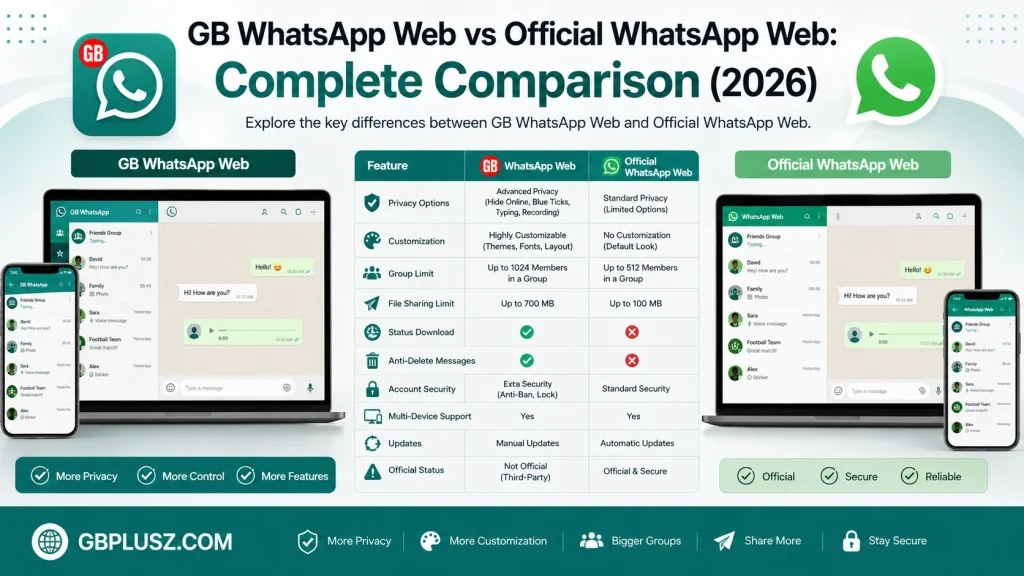
This guide compares GB WhatsApp Web and Official WhatsApp Web to help you understand their features, advantages, and limitations before choosing the option that best fits your needs.
What Is GB WhatsApp Web?
GB WhatsApp Web refers to using GB WhatsApp alongside a desktop or browser environment. Since GB WhatsApp is a third-party modified version of WhatsApp designed for Android, it does not have its own official web service. Users who access GB WhatsApp on a computer generally rely on Android emulators or compatibility methods rather than an official browser platform.
GB WhatsApp focuses on providing additional customization features, enhanced privacy settings, and extra messaging tools that are not included in the official application.
What Is Official WhatsApp Web?
Official WhatsApp Web is the browser-based version of WhatsApp developed by WhatsApp. It allows users to access their chats from a computer by linking their mobile device or using the app’s multi-device feature.
It is designed with security, reliability, and regular updates in mind, making it the preferred option for users who want a stable and officially supported messaging experience.
Quick Comparison
| Feature | GB WhatsApp Web | Official WhatsApp Web |
|---|---|---|
| Developer | Third-party developers | |
| Official Support | No | Yes |
| Browser Version | No dedicated official web platform | Official browser version available |
| Security Updates | Depends on third-party releases | Regular official updates |
| Custom Themes | Yes | No |
| Extra Privacy Options | Yes | Limited |
| Multi-Device Support | May vary | Yes |
| Reliability | Depends on version | Highly reliable |
| Risk of Restrictions | Higher | Very low when following the service terms |
Installation And Setup
GB WhatsApp Web
Using GB WhatsApp on a computer usually requires:
- An Android emulator or compatible desktop environment
- Installing the GB WhatsApp APK
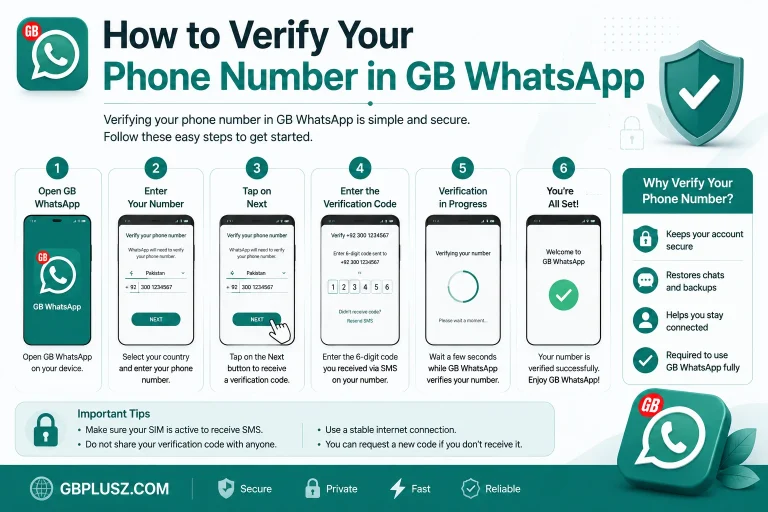
- Verifying your phone number
- Completing the account setup process
Because there is no official GB WhatsApp Web platform, the setup process is generally more complex.
Official WhatsApp Web
Official WhatsApp Web is much easier to use.
Users simply:
- Open the official WhatsApp Web page in a browser.
- Link their account using the companion device feature in WhatsApp.
- Start messaging almost immediately.
The process is simple and supported directly by WhatsApp.
Features Comparison
Privacy Features
GB WhatsApp offers several additional privacy options that may include:
- Hide online status
- Hide typing indicators
- Hide recording status
- Freeze last seen
- Advanced privacy customization
Official WhatsApp Web includes standard privacy controls but does not provide the same level of customization.
Customization
One of GB WhatsApp’s biggest attractions is personalization.
Users can often customize:
- Themes
- Fonts
- Chat appearance
- Icon styles
- Interface colors
Official WhatsApp Web has a clean, consistent design with limited appearance options.
Security
Security is one of the biggest differences.
Official WhatsApp Web benefits from:
- End-to-end encryption
- Regular security updates
- Official maintenance
- Continuous bug fixes
GB WhatsApp, as an unofficial modification, may not receive the same level of security review or long-term support. Users should understand these potential risks before choosing to use it.
Performance
Official WhatsApp Web is generally optimized for stability and speed across supported browsers.
GB WhatsApp performance may vary depending on:
- Emulator quality
- Device specifications
- GB WhatsApp version
- Android compatibility
Updates
Official WhatsApp Web receives automatic improvements through official updates.
GB WhatsApp updates depend on third-party developers, so users often need to manually install newer versions.
Advantages Of GB WhatsApp Web
Some users choose GB WhatsApp because of:
- More customization options
- Additional privacy settings
- Flexible interface personalization
- Extra messaging tools
- Enhanced media-sharing capabilities
These features appeal to users who want greater control over the app’s appearance and behavior.
Advantages Of Official WhatsApp Web
Official WhatsApp Web offers several important benefits:
- Official support
- Better security
- Stable performance
- Reliable synchronization
- Regular updates
- Easier setup
- Excellent compatibility with modern browsers
It is generally the better choice for users who prioritize reliability and account security.
Which One Should You Choose?
Your choice depends on your priorities.
Choose Official WhatsApp Web if you want:
- A secure messaging experience
- Regular updates
- Official support
- Stable performance
- Easy browser access
Choose GB WhatsApp only if you understand the limitations of unofficial software and are specifically looking for additional customization and privacy features.
Frequently Asked Questions
Does GB WhatsApp Have An Official Web Version?
No. GB WhatsApp does not provide an official browser-based web platform like Official WhatsApp Web.
Which Is More Secure?
Official WhatsApp Web is generally considered more secure because it is developed and maintained by WhatsApp and receives regular security updates.
Can I Use Both?
Some users maintain separate installations, but compatibility and account behavior may vary depending on the version and configuration being used.
Is GB WhatsApp Supported By WhatsApp?
No. GB WhatsApp is an independent third-party modification and is not developed, approved, or supported by WhatsApp or Meta.
Final Thoughts
When comparing GB WhatsApp Web vs Official WhatsApp Web, the biggest differences are official support, security, and customization.
Official WhatsApp Web provides a stable, secure, and officially supported messaging experience that works seamlessly across browsers and devices. GB WhatsApp, on the other hand, offers additional customization and privacy features but relies on unofficial software and does not have its own official web platform.
Before deciding which option to use, consider your priorities, understand the risks associated with third-party applications, and always keep your important conversations backed up.
GBWHASAPP.COM continues to publish informative guides, comparisons, troubleshooting articles, and the latest GB WhatsApp updates to help users make informed decisions.